


How to List Your Car for Rent on HAUP in Thailand
Jan 20
4 min read
Updated: Jan 21
If you own a car and want to earn extra income, listing your car for rent on HAUP is a simple and flexible way to get started. HAUP is a trusted car-sharing platform that connects local car owners with travelers and renters across Thailand.This guide will walk you through how to list your car for rent on HAUP, from registration to completing your car listing step by step.
Who Can List a Car for Rent on HAUP
Anyone who owns a car in Thailand can become a HAUP Partner and list their car for rent, as long as the vehicle meets HAUP’s basic requirements.
You can list your car for rent on HAUP if:
You are the car owner or have permission from the owner
The car is registered in Thailand
The vehicle is in good condition and ready for rental
You are willing to manage availability through the HAUP platform
HAUP welcomes private car owners, individuals with multiple vehicles, and local partners who want to earn income from their cars.
Login as a HAUP Partner
Open the HAUP app
Tap Profile in the bottom menu
Select Share your car
Log in using Apple ID, Gmail, or LINE (LINE is recommended)

Steps to List Your Car for Rent on HAUP
Listing your car for rent on HAUP can be completed directly through the HAUP app in just a few steps.
Share your car in 3 simple main steps to be listed on the platform
Step 2: Add Your Car Location Step 3: Set Your Rental Price 2 more steps that help boost your visibility and trust. Step 4: Upload Photos of Your Car Step 5 : Upload Required Documents
Add LINE After Registration to Verify Your Identity (Recommended)
Step 1: Tell Us About Your Car

Provide basic information about your vehicle so renters know exactly what they are booking.You will be asked to enter:
Brand, model, and year
Key features and special functions
Fuel type and transmission
Clear and accurate details help your car stand out and build trust with renters.
Step 2: Add Your Car Location

Set the location where your car is usually parked, such as:
Your home
A condo or apartment
A public parking lot
This helps renters know where they can pick up and return the car.
Step 3: Set Your Rental Price

You can choose to:
Use HAUP’s suggested price based on market data, or
Set your own rental price
This step allows you to control how much you earn when you list your car for rent on HAUP.
Step 4: Upload Photos of Your Car

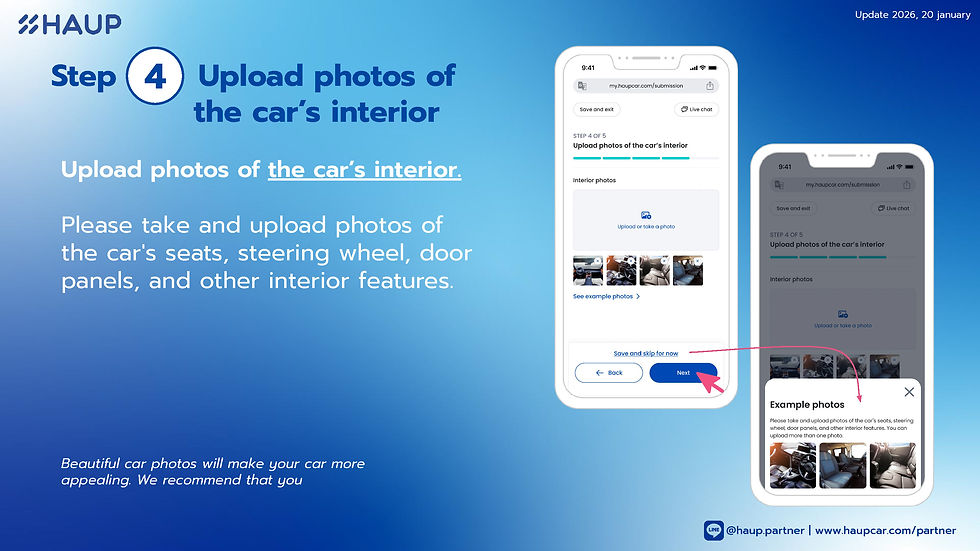
High-quality photos improve visibility and increase booking chances.Upload clear images of:
Exterior angles (front, rear, side views)
Interior details such as seats, steering wheel, and dashboard
Photos should be taken in horizontal format for best results.
Step 5 : Upload Required Documents

Submit the necessary documents to verify your car and complete the listing process.Once approved, your car will be listed on the HAUP platform and ready for rental.

Add LINE After Registration

Add LINE After Registration to Verify Your Identity (Recommended)
After you complete your car listing submission on the HAUP app, there is one highly recommended step to help speed up the verification process — adding HAUP Partner on LINE.
Connecting via LINE allows our admin team to verify your identity and link your account with your vehicle quickly and securely.
How to Add LINE for Identity Verification
Add LINE ID 👉 @haup.partner or Click
Open the chat and send the following information:
Vehicle license plate number
Phone number used for registration
Email address registered on the HAUP app
Wait for confirmation from the HAUP admin team
Once verified, your car listing will be ready to receive booking requests faster.
Benefits of Renting Out Your Car with HAUP
Listing your car for rent on HAUP comes with several advantages:
Earn extra income from your existing car
Flexible pricing and availability control
Access to local and international renters
Secure platform with partner support
Increased visibility through HAUP’s trusted community
HAUP makes car sharing easy, transparent, and reliable for car owners.
FAQs About Becoming a HAUP Partner
Do I need a business license to list my car for rent on HAUP?
No. Individual car owners can list their cars without a business license.
Can I set my own rental price?
Yes. You can use HAUP’s suggested price or set your own price.
Is it difficult to manage bookings?
No. All bookings and availability are managed through the HAUP app.
Can I list more than one car?
Yes. HAUP Partners can list multiple vehicles on the platform.
If you’re ready to earn from your car, now is the perfect time to list your car for rent on HAUP and join Thailand’s growing car-sharing community 💙
Who Is HAUP?
HAUP is a Thai car-sharing platform that connects car owners with people looking for nearby car rentals through a single app.
HAUP is designed to help:
Car owners generate income by renting out their existing vehicles
Renters access quality, local cars easily, safely, and conveniently
With a transparent system, commercial insurance standards, and a professional support team available 24/7, HAUP is a reliable option for anyone looking to start renting out their car — whether through hands-on management or fully automated car sharing.
HAUP believes that “Sharing one car can create income, opportunities, and sustainable growth for local communities.”
Rent out your car on HAUP app.
Easy to get started, safe, and supported system.
Rent out your car through HAUP. Free registration, no fees.
📌 Register online at https://www.haupcar.com/partner
💬 For more information, contact LINE: @haup.partner or Click
👥 Community of sharing: HAUP Community | แชร์รถ สร้างรายได้ Carsharing
I was searching for more general information about DM WIN and found the explanation useful because it covers some of the basic things a new user would normally want to know. Having separate information about registration, login, account management, and support makes it easier to find the right section. I also think users should pay attention to responsible participation and avoid assuming that any game or activity can guarantee a particular result. Checking the official information before making any decision is always a sensible step.